
Is Snapchat deleting your Memories?
Pick your ZIPs and the tool sorts your Memories into a folder on this phone.
No export yet? The 4-step guide


What the video shows
- Before: the export sits in a phone's camera roll, and years of Memories pile up on today's date.
- The Biarritz photo has lost the caption and sticker it had in Snapchat, and videos come in 10-second pieces.
- GetMemoriesOut fixes the export in your browser, so nothing leaves your computer.
- After: each Memory is back on its real day, the 10-second pieces are joined into one video when their order is certain, and the Biarritz photo has its caption and sticker again.
Updated November 8, 2026 · Not affiliated with Snapchat.
By GetMemoriesOut. We wrote these guides from a real Snapchat export that we opened and counted, with Memories from 2016 to 2026. When something couldn't be checked, the guide says so.
Seen a post saying Snapchat is deleting Memories?
- “Snapchat starts deleting Memories on September 1st.” September 1, 2026 has passed. Snapchat's help, updated September 10, 2026, says: “No Memories will be archived before January 2027.”
- “In just 47 days, Snapchat will begin deleting Memories.” No countdown holds, because Snapchat hasn't given a day. It says archiving starts in January 2027, with a notice in the app first.
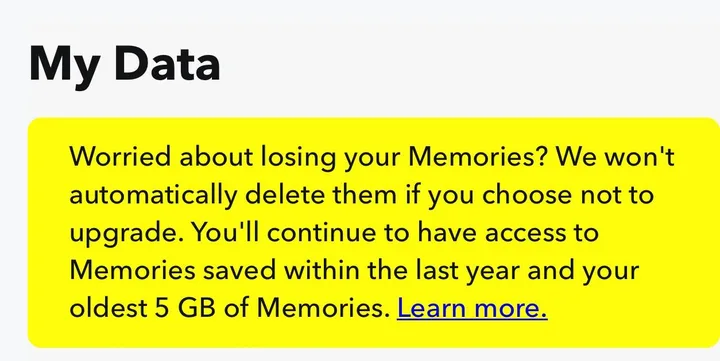
- “12 months to save your Snapchat Memories.” The 12 months come from Snap's announcement of September 26, 2025, which promised “12 months of temporary Memories storage”. After them, Snapchat's help says older Memories get archived and stay stored on Snapchat.
- “Snapchat Memories could be deleted unless users pay.” Snapchat's help of September 30, 2025 did say that past 5 GB without a plan, the most recent Snaps would be deleted. By February 6, 2026, that sentence was gone.
These titles ranked in Google for this question on November 3, 2026. We read Snapchat's help again on November 8, 2026: “Snapchat will not automatically delete your Memories because you do not upgrade.”
How long Snapchat takes to send your export
“We strive to deliver data within 7 days, but large downloads can take longer.”
Request your export now. Outside busy periods, users report about an hour, and ours, 27.7 GB, took 55 minutes on 9 November.
When Snapchat announced paid storage in October 2025, users reported 6 days, 14 days and up to 6 weeks. These are Reddit reports and a single test of ours, not a measurement.
While you wait
- Request your export now, for all your Memories, with no date filter.
- Don't request it again right away: check See exports first.
- If the email doesn't arrive, open accounts.snapchat.com, My Data, then See exports. A ready export downloads from there.
- Check your spam folder.
- When it's there, download every ZIP, then drop them into GetMemoriesOut on your computer. The recap is free.
Nothing after 7 days? The Export never arrived guide lists what to check.
When does it start?
- September 26, 2025. Snap announces paid Memories storage and promises accounts over 5 GB “12 months of temporary Memories storage” (Snap's announcement).
- September 2026. Snapchat's help, updated on September 10, sets the date: “No Memories will be archived before January 2027.” Some sites said September 2026, and nothing was archived then.
- January 2027. Archiving starts. Snapchat says it will “provide advance notice in the app before anything changes for you.”
We read Snapchat's help page on Memories storage again on November 8, 2026, and we update this page when Snapchat changes the rule.
Which Memories get archived?
- Memories saved in the past year stay as they are.
- Your oldest 5 GB of Memories stay as they are too.
- The rest, more than a year old and past those 5 GB, gets archived.
Archived Memories “remain stored on Snapchat” and “appear as thumbnails in the app”, in Snapchat's words. To open, edit or share one, you need a storage plan.
If all your Memories fit in 5 GB, the rule leaves every one of them where it is.
Say you have 12 GB of Memories, 2 GB of them from the past year. Your oldest 5 GB stay, so do those 2 GB, and the 5 GB in between get archived.
Am I over 5 GB? Check your storage
- In My Account, tap the gear icon to open Settings.
- Scroll down to My App.
- Tap Memories and look under Cloud Storage.
That's the path in Snapchat's help. Over 5 GB, a notice also shows in the Memories tab, with how much storage you use.
The archive checker counts how many of your Memories will be over a year old, from their list.
Keep all your Memories without paying Snapchat
Snapchat's help names two ways to reach archived Memories: “subscribing or downloading your Memories”. Downloading is free, through the My Data export.
- In Snapchat, open Settings, then My Data.
- Turn on Export your Memories and tap Request Only Memories.
- Snapchat emails you a link about an hour after you ask in normal times, longer when Snapchat is busy. Download every ZIP on a computer.
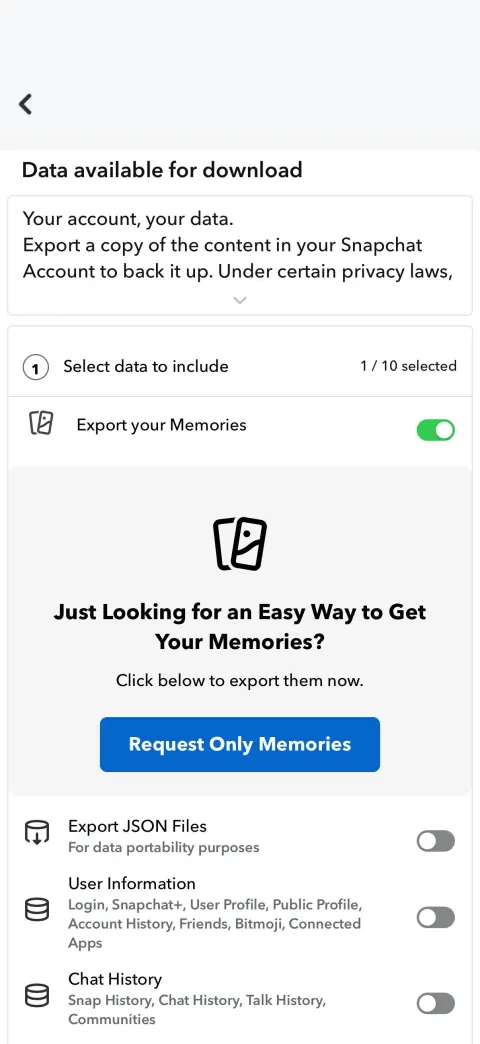
The download guide covers Windows and Mac. Keep every ZIP. The export comes out broken, and GetMemoriesOut repairs it on your computer.
Count what you have before you clear space
An export can come back incomplete, for example when a ZIP is missing. Before you delete anything in the app, check that every year made it.
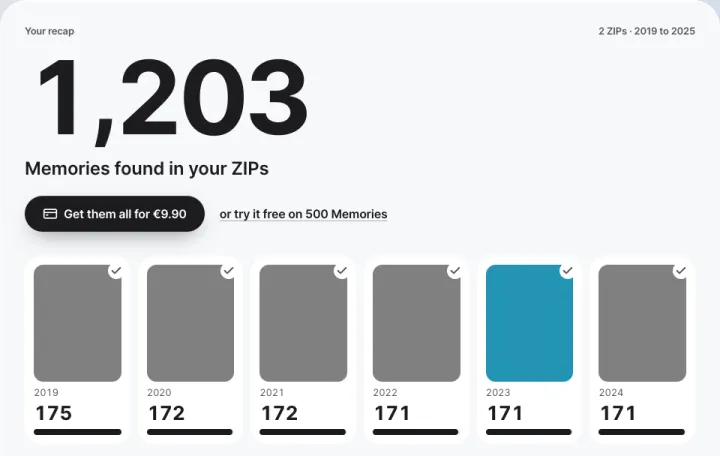
The recap is free and runs on your computer, so your files stay there.
500 Memories come back free, picked across all your years. Each one keeps its day and its captions, as in Snapchat. The rest costs €9.90, one time. Drop your ZIPs here.500 Memories come back free, picked across all your years. Each one keeps its day and its captions, as in Snapchat. The rest costs $9.99, one time. Drop your ZIPs here.
What a Snapchat storage plan costs
In the US, Snapchat's help lists a 100 GB Memories-only plan at $1.99 a month or $20 a year. Snapchat+ includes 250 GB of Memories storage, and Snapchat+ Platinum 5 TB.
“Prices may vary by market and local currency,” the same page adds. The storage plans guide lists every plan and what the 100 GB plan costs over five years.
Snapchat's storage rule, version by version
Six versions of Snapchat's help article on Memories storage have been recorded since September 2025. Each link opens the Wayback Machine copy; the rule history quotes them in full.
- Version A, September 30, 2025 to January 14, 2026. Past 5 GB without a paid plan, the most recent Snaps are deleted.
- Version B, seen on February 6, 2026 only. The sentence about deleting recent Snaps is gone.
- Versions C and D, March to July 2026: wording only.
- Version E, July 11 to August 6, 2026. Only the Family Plan changes.
- Version F, first copy on October 1, 2026. No deletion, archiving from January 2027 instead. Memories more than a year old outside your oldest 5 GB are archived, and none before January 2027.
Notice log: has Snapchat given the day?
Each reading of Snapchat's sources, newest first: its help article on Memories storage and Snap's newsroom. The notice in the app only shows in the app, so we can't check it here.
- November 8, 2026. No day given. The help article, last updated September 10, 2026, still says “starting in January 2027”. Snap's newsroom home page has nothing about archiving.
- October 13, 2026. No notice in the help or the newsroom. The help article says “starting in January 2027”, with no exact day.
The January list sends at most 5 emails about archiving until the end of January 2027. We delete your address after that.
FAQ
- Is Snapchat deleting Memories in 2027?
- No. Snapchat's help says it “will not automatically delete your Memories.” From January 2027, those over a year old and outside your oldest 5 GB are archived and stay stored on Snapchat.
- When will Snapchat start archiving Memories?
- Not before January 2027, according to Snapchat's help, read again on November 8, 2026. There's no exact day yet, and Snapchat promises a notice in the app before anything changes for you.
- What happens if I don't pay for Snapchat storage?
- Memories from the past year and your oldest 5 GB stay as they are. The rest shows as thumbnails, and opening them takes a storage plan. You can also download them for free.
- Can I still download my Memories for free?
- Yes. The My Data export is free, and Snapchat's help names downloading as one of your two options. The export guide shows where to tap.
- Is there a deadline to export?
- Snapchat's help doesn't give one. It says no Memories will be archived before January 2027, and that you'll get a notice in the app before anything changes.
More guides
- Storage plans: what they include
- Snapchat's storage rule, version by version
- Deleted Memories and where copies may remain
- Back up your Memories
- A large export, on an external drive
- All your Memories on your computer
- Memories to your iPhone camera roll
- My Eyes Only and the export
- Snapchat Download My Data, step by step