
How to back up your Snapchat Memories
Pick your ZIPs and the tool sorts your Memories into a folder on this phone.
No export yet? The 4-step guide


Updated November 8, 2026 · Not affiliated with Snapchat.
By GetMemoriesOut. We wrote these guides from a real Snapchat export that we opened and counted, with Memories from 2016 to 2026. When something couldn't be checked, the guide says so.
Back up in 3 steps
- In Settings, tap My App, then Memories. Backup Progress should say “Complete”.
- Request your own copy: in Settings, tap My Data, turn on Export your Memories, turn off the date filter, then tap Submit.
- When the email arrives, download every ZIP on a computer, then copy them to a second place, such as an external drive.
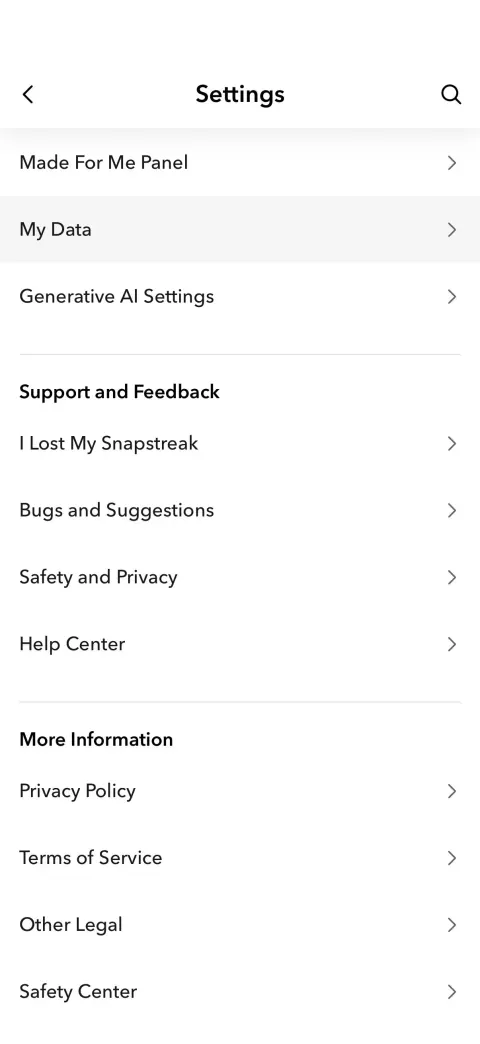
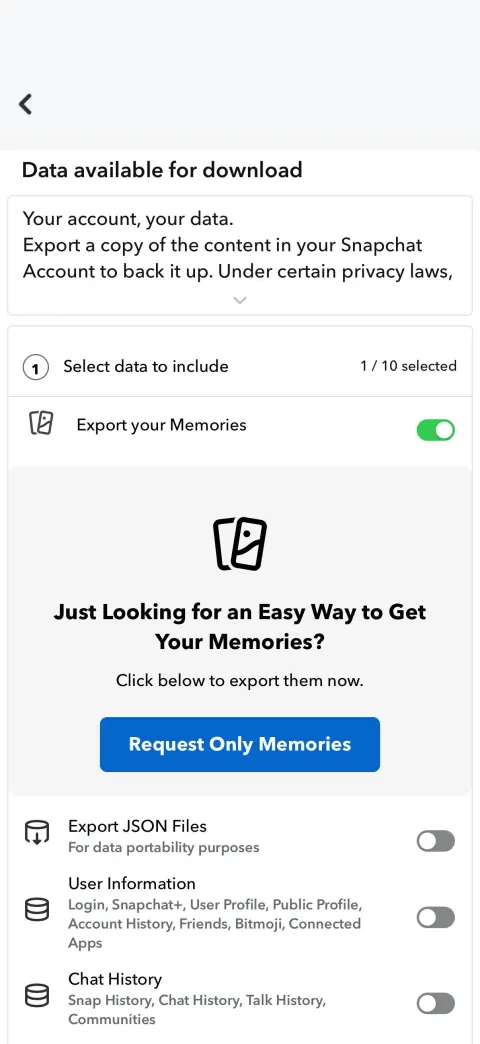
The export guide shows each screen. GetMemoriesOut then sorts everything into one folder per year.
Step 1 in detail: Snapchat's backup
From Snapchat's help article “How do I make sure my Memories are backed up?”, read on October 17, 2026:
- In My Account, tap the gear icon to open Settings.
- Under Apps & Privacy, tap My App, then Memories.
- Look at Backup Progress. It should say “Complete”.
A number of Snaps left, or “No Network Connection”, means the backup isn't finished. Connect to Wi-Fi or find a better mobile signal, then check again.
Snapchat's help says Memories that weren't backed up can't be recovered, so check before you log out, switch phones or uninstall the app. Photos in your camera roll aren't backed up to Memories.
Step 2 in detail: the My Data export
Snapchat's backup lives on its servers. Your own copy comes from the free My Data export, the only way to get all of them out at once:
- In Settings, tap My Data, or sign in at accounts.snapchat.com.
- Turn on Export your Memories.
- Turn off the date filter, so the export covers every year.
- Tap Submit. It arrives about an hour after you ask in normal times, longer when Snapchat is busy; very large exports can take longer.
- When the email arrives, download every ZIP on a computer.
If the ZIPs won't fit on your laptop, the large export guide covers external drives.
A few Memories at a time: export them to your phone
For a handful of Memories, Snapchat's help article “How do I download a Snap from Memories?” (read October 17, 2026) gives two ways:
- One Memory: press and hold it, tap Export, then choose where to save it.
- Several: tap the selector icon at the top of Memories, tap each Snap you want, then use the export options at the bottom of the screen.
You can also change where a Snap goes when you save it: in Settings, My App, Memories, set Save Button to Memories & Camera Roll.
The camera roll guide covers iPhone, the Android guide covers the gallery.
Step 3 in detail: put your copy somewhere safe
If the laptop holding your export breaks or is stolen, the Memories go with it. Once they are out of Snapchat, copy them to at least one other place:
- An external drive. The large export guide shows how to work from one.
- iCloud Photos. The iCloud guide covers the import and the dates.
- Google Photos. The Google Photos guide does the same.
Where GetMemoriesOut fits
Snapchat's export arrives as ZIPs, and not every photo and video inside carries its date (the date guide explains why).
GetMemoriesOut runs on your computer and uploads nothing. Its free recap counts what arrived against Snapchat's list of your Memories. Sorting everything into one folder per year, each file at its date, costs €9.90, once.GetMemoriesOut runs on your computer and uploads nothing. Its free recap counts what arrived against Snapchat's list of your Memories. Sorting everything into one folder per year, each file at its date, costs $9.99, once.
FAQ
- Does Snapchat back up my Memories?
- Yes, on its own servers. Check that Backup Progress says “Complete”. For your own copy, use the My Data export.
- Do Memories back up to iCloud or Google Photos?
- Not on their own. Export them first, then import them: the iCloud and Google Photos guides show how.
- Do I lose my Memories in January 2027 without a backup?
- No. Memories more than a year old beyond your oldest 5 GB are archived, not deleted, and opening one takes a paid plan. A My Data export gives you your own copy.
- Can Snapchat recover lost Memories?
- No, its help says lost Memories can't be recovered. Try updating the app and restarting your phone first.
- How do I back up Memories to my computer?
- Request the My Data export with no date filter, then download every ZIP on the computer.