
How to save Snapchat Memories to your iPhone camera roll, with their dates
Pick your ZIPs and the tool sorts your Memories into a folder on this phone.
No export yet? The 4-step guide


Updated November 8, 2026 · Not affiliated with Snapchat.
By GetMemoriesOut. We wrote these guides from a real Snapchat export that we opened and counted, with Memories from 2016 to 2026. When something couldn't be checked, the guide says so.
All your Memories in 4 steps
- Request the export from your iPhone. The export guide shows where to tap.
- When the email arrives, open the link on a computer and download every ZIP.When the email arrives, open the link on this phone and download every ZIP.
- Drop the ZIPs into GetMemoriesOut on that computer. You get a folder sorted by year (a single ZIP in Safari or Firefox), the date written in every file.Drop the ZIPs into GetMemoriesOut on this phone. You get a folder sorted by year (a single ZIP in Safari or Firefox), the date written in every file.
- Import that folder into Photos. Each Memory lands on its own day.
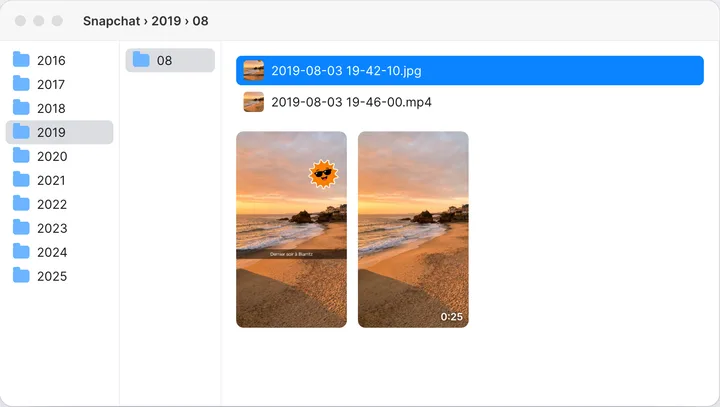
The tool also opens on iPhone and hands you back a ZIP.
Import the folder into Photos
- From a Mac: open Photos, then File › Import, and pick the folder. With iCloud Photos on, it all reaches your iPhone.
- From a Windows PC: on icloud.com, open Photos and use the upload button. Or install iCloud for Windows and drag the files into iCloud Photos. The iCloud guide has both routes.
- Without iCloud: Google Photos on the iPhone also reads the date written in the file. The Android guide covers uploading through the Google Photos website.
Because the date is written in every file, Photos puts each Memory on its own day. The import day changes nothing.
Make a separate album if you want to keep them apart from your other photos.
A few Memories: from the app
- Swipe up from the Camera screen to open Memories.
- For one Memory, press and hold it, then tap Export. For several, tap the selector icon at the top of Memories, then tap each Snap you want.
- Choose where to download them, such as your camera roll.
Snapchat's help gives no limit on how many Memories you can select at once, and we haven't measured one.
The catch is the date. A Memory saved this way often takes the day you saved it, so a photo from 2017 lands next to today's photos.
On the plus side, the app saves each Memory with its caption and stickers on it.
Choose where new Snaps go
- In My Account, tap the gear icon to open Settings.
- Under App & Privacy, tap My App, then, under Customize My App, Memories.
- Tap Save Button and choose Memories, Memories & Camera Roll or Camera Roll.
With Memories & Camera Roll, each new Snap goes to both places. Camera Roll alone skips Memories, so Snapchat keeps no backup of those Snaps.
Memories alone stops Snapchat from filling your camera roll. Memories you already have don't move. Steps from Snapchat's help, read on November 2, 2026.
Memories or camera roll: which is which
Memories is Snapchat's own album, stored on its servers and tied to your account. The camera roll is your phone's photo library.
A Snap saved only to Memories isn't in your camera roll, and a photo in your camera roll isn't backed up to Memories. Snapchat's help says so in its backup article.
To copy photos the other way: in Settings, tap My App, then Memories, then Import Snaps from Camera Roll, and pick the ones you want.
Steps from Snapchat's help, read on November 2, 2026.
Space on the iPhone and in iCloud
An account used for years can hold thousands of Memories. From the app, each one would have to be picked by hand and could land on today's date.
A big export can weigh tens of GB, chats included, and a large export takes room at every step. Check your free iCloud space before importing.
If it's short, keep the folder on your computer or an external drive and import only some years.
FAQ
- How do I save all my Memories to the camera roll?
- Request the export, write the dates into the files on a computer, then import the folder into Photos.
- Why are my Memories on today's date?
- The saved file doesn't carry the Memory's date, so Photos often uses the day you saved it.
- Does GetMemoriesOut work on iPhone?
- Not yet. It needs a computer. From the iPhone, you can request the export and send yourself the link.
- Can I do it without a computer?
- For a few, from the app, often on today's date. For all of them, you need a computer.
- How do I stop Snapchat saving to my camera roll?
- In Settings, tap My App, Memories, Save Button, then Memories. Photos already there stay.
- How do I back up my camera roll on Snapchat?
- In Settings, My App, Memories, tap Import Snaps from Camera Roll and pick the photos.