
Why do my Snapchat Memories show the wrong date after export?
Pick your ZIPs and the tool sorts your Memories into a folder on this phone.
No export yet? The 4-step guide


Updated November 11, 2026 · Not affiliated with Snapchat.
By GetMemoriesOut. We wrote these guides from a real Snapchat export that we opened and counted, with Memories from 2016 to 2026. When something couldn't be checked, the guide says so.
Put the real date back in 3 steps
- Request the export and download every ZIP on a computer. The export guide shows how.
- Drop the ZIPs into GetMemoriesOut. It writes each date, time and location into its file and sorts them by year (in a single ZIP in Safari or Firefox).
- Copy the sorted folder to your phone, or upload it. Each Memory keeps its day.
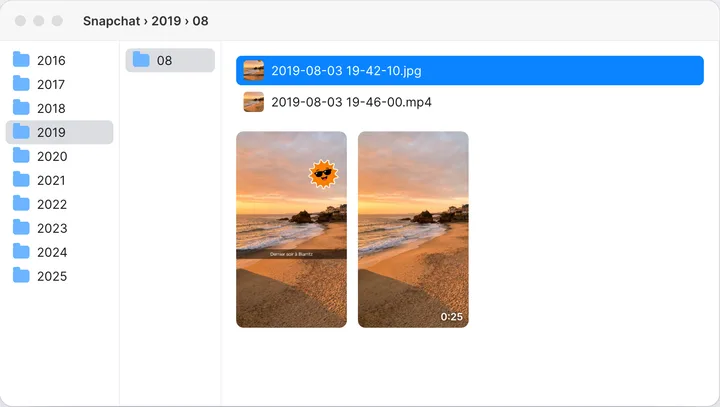
A file the tool can't date for sure goes into an “Unsorted” folder, never with a made-up date.
What the export keeps, and what it loses
Each file comes out of the ZIP with the date and time of its Memory. Videos also have a date saved inside the file. What gets lost:
- The location: no file in the export has it. It's only in the list of your Memories.
- The date on photos: no photo has a capture date saved inside. Its date is only the file's date. Copy or upload it in a way that rewrites the file, and that date is replaced with today's.
- The time on a Mac: when you double-click the ZIP, Finder shifts the files' time by your Mac's offset from UTC, and a Memory can land on a different day.
- Captions and stickers: they come in a separate file. Your camera roll shows the photo without them.
Where to find the date and location
- The file name starts with the day, for example 2023-07-14_…-main.jpg. That gives you the day, but not the time.
- The list of your Memories, a file in the json/ folder of the first ZIP, has the date and time of each Memory, plus the location if Snapchat saved one.
The day is enough to sort your Memories by date. For the exact time and the location, you need the list.
What the list of your Memories holds
The list is a text file called memories_history.json. It holds a single list, “Saved Media”, with one entry per Memory. Every entry has the same five fields:
- Date: the date and time of the Memory, for example 2026-01-17 19:30:32 UTC. In older exports the UTC label is missing.
- Media Type: Image for a photo, Video for a video.
- Location: for example Latitude, Longitude: 48.8584, 2.2945. When Snapchat has no location, the latitude and longitude are 0.
- Download Link and Media Download Url: GetMemoriesOut doesn't use them, it reads the files in your ZIPs.
If your count is lower than you expected, read the missing Memories guide. The archive checker reads only this file, on your computer, and counts how many of your Memories will be over a year old on January 1, 2027.
Why no line says which file it belongs to
Since 2026, the export no longer links a file to its line in the list. None of the five fields gives the file name.
The only clue is the file's time in the ZIP, accurate to 2 seconds, with no time zone.
To tell which line goes with which file, you have to compare times. Two Memories taken within the same 2 seconds look the same, and the ZIP time can be several hours off from the list time.
Fixing a few photos by hand
For a dozen photos, you can do it yourself.
- Open the list of your Memories in a text editor. Find the entries whose Date starts with the day in the file name, written YYYY-MM-DD.
- Write down the time, and the location if there is one. The time is in UTC: in New York, subtract four hours in summer and five in winter, and watch the day.
- On Windows, right-click the photo, then Properties, Details tab, “Date taken” field. On a Mac, in Photos, choose Image, then Adjust Date and Time.
- Repeat for every file.
For the location, you need an app that writes a latitude and a longitude into the photo. A location of 0, 0 means Snapchat saved none. Past a few dozen files, expect it to take hours.
Why the time can be off
The list gives the time in UTC: a Memory listed as 2026-01-17 19:30:32 UTC was taken at 2:30 PM New York time.
A tool that writes it as is shifts every Memory you took in New York by four or five hours, so a photo taken at 11 PM lands on the next day.
GetMemoriesOut works out the time zone from the location saved with each Memory, offline. A Memory taken in Los Angeles keeps Los Angeles time. With no location, it uses your computer's time zone.
What the tool does and doesn't do
It finds one offset in whole hours between the files' times and the list times, and dates a file only when exactly one entry falls within 2 seconds of it.
The recap is free. Your whole library costs €9.90, once, with a refund within 14 days if it didn't work on your export.The recap is free. Your whole library costs $9.99, once, with a refund within 14 days if it didn't work on your export.
- It doesn't guess the order of a video's 10-second clips: each stays a separate file, with its own date.
- When two different dates fall within 2 seconds of the same file, or no whole-hour offset lines up, the file goes into “Unsorted”.
- It runs on a computer, in Chrome, Edge, Safari or Firefox. With an iPhone, use it on your computer, then move the folder to your phone.
- It handles your Memories, the memories/ folder. Photos and videos from your chats (chat_media/) are left out.
FAQ
- Why is the date wrong after export?
- Photos hold no date inside, so copying can replace it with today's.
- Why do my photos show today's date?
- Same cause. Their date lives only on the file.
- What is the list of my Memories?
- A file with each Memory's date, time, type and location.
- Where is that list?
- In the json folder of the first ZIP.
- Does it say which file is which?
- No. The only clue is the file's time in the ZIP.
- Why is the time off?
- The list uses universal time. Add or subtract your offset.
- Why is there no location?
- Only the list has it. GetMemoriesOut writes it into your files.
- What does 0, 0 mean?
- Snapchat has no location for that Memory.
- Will my camera roll show the right date?
- Yes, once the date is saved inside the file.