
Download all your Snapchat Memories at once
Pick your ZIPs and the tool sorts your Memories into a folder on this phone.
No export yet? The 4-step guide


What the video shows
- Before: the export sits in a phone's camera roll, and years of Memories pile up on today's date.
- The Biarritz photo has lost the caption and sticker it had in Snapchat, and videos come in 10-second pieces.
- GetMemoriesOut fixes the export in your browser, so nothing leaves your computer.
- After: each Memory is back on its real day, the 10-second pieces are joined into one video when their order is certain, and the Biarritz photo has its caption and sticker again.
Updated November 12, 2026 · Not affiliated with Snapchat.
By GetMemoriesOut. We wrote these guides from a real Snapchat export that we opened and counted, with Memories from 2016 to 2026. When something couldn't be checked, the guide says so.
The 4 steps
- In Snapchat, tap your profile, the gear icon, then My Data.
- Turn on Export your Memories and tap Request Only Memories.
- When Snapchat's email comes, download every ZIP on a computer, the first one included.When Snapchat's email comes, download every ZIP on this phone, the first one included.
- Drop all the ZIPs into GetMemoriesOut at once.
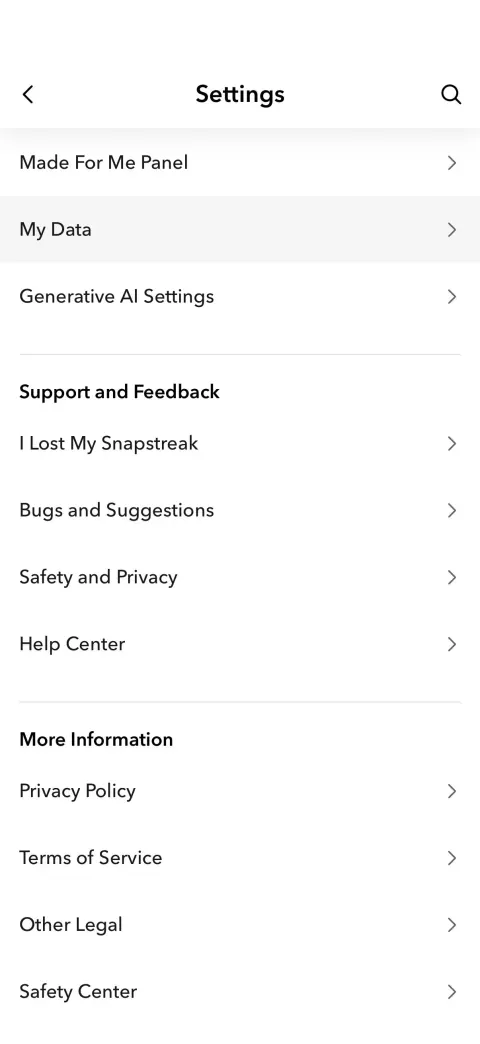
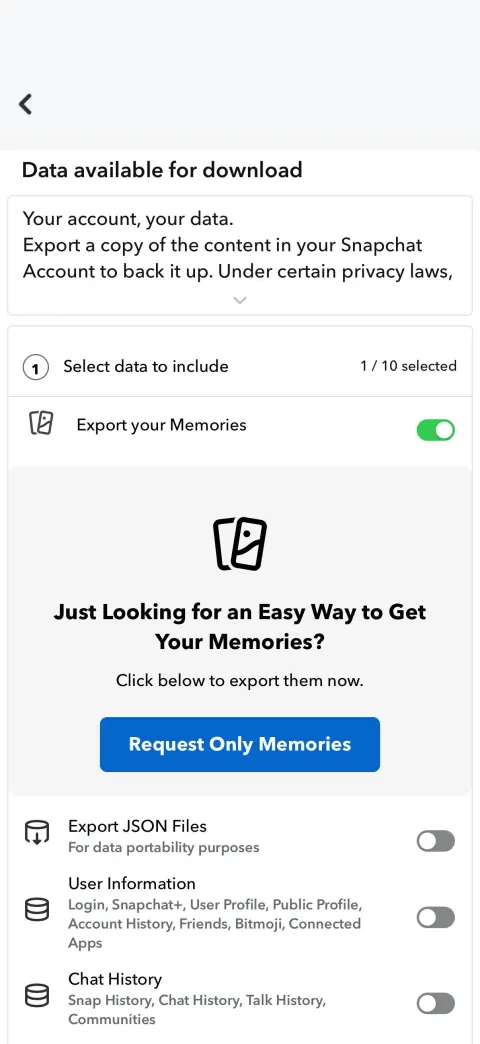
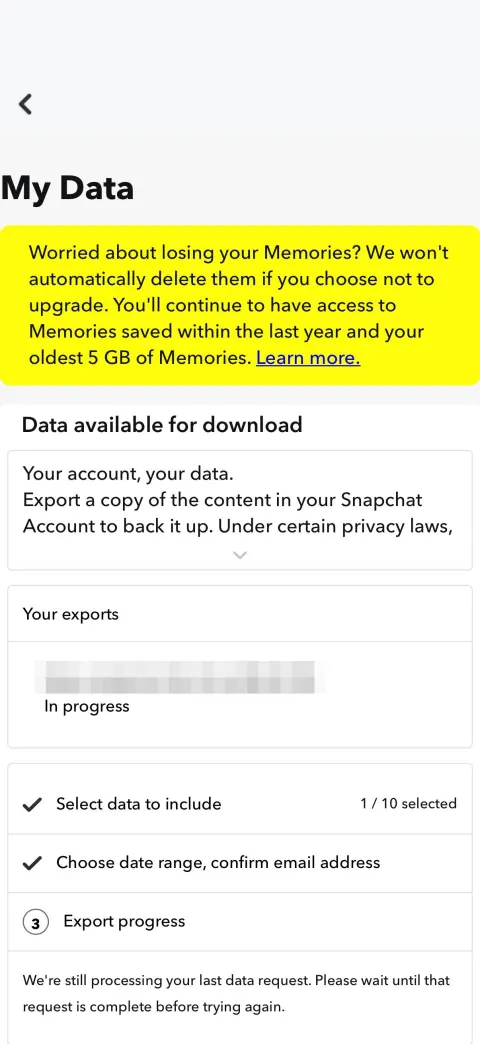
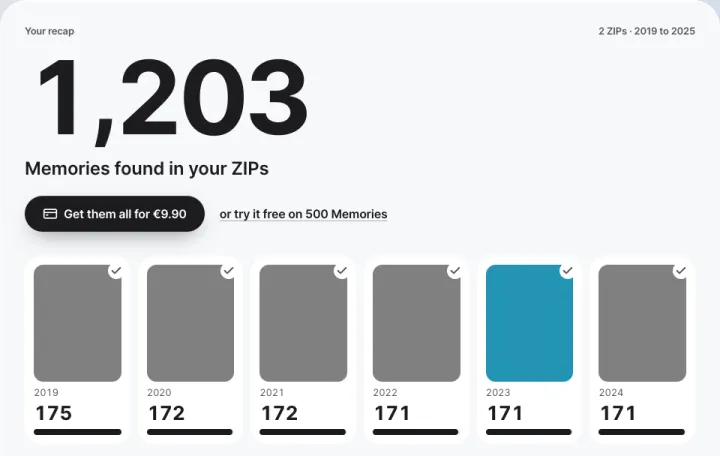
Step 4 fixes the export: photos with no date inside take today's date once copied, videos come in 10-second clips.
Steps 1 to 3 are free. In step 4, the recap and 500 Memories are free; the rest costs €9.90, one time.Steps 1 to 3 are free. In step 4, the recap and 500 Memories are free; the rest costs $9.99, one time.
What you end up with
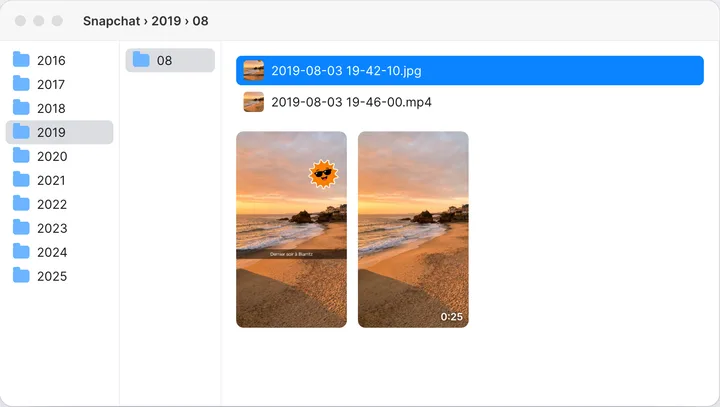
- One folder per year, then per month, each file named after its date and time.
- Date and time written into every file, in the local time of where the Memory was taken.
- Location back when Snapchat has it, captions back on photos, duplicates removed.
- Split videos rejoined when the clip order is certain (the video guide has the details).
Then copy the folder to your iPhone or to Android.
What the export gives you as is
Files come out of the ZIP with their date, but no date or location is written inside the photos. Copied to a phone or uploaded to the cloud, they take today's date.
Captions and stickers sit in separate files, and long videos come cut into 10-second clips.
The ZIP guide goes file by file, and this comparison shows what each way of sorting gives you.
A big account: several ZIPs
- Several ZIPs of about 2 GB. The list of your Memories is in the first one only.
- The first ZIPs can hold nothing but chat media, and the Memories come after, so don't stop halfway.
- Free space: at least the size of your ZIPs, twice that if you unzip them.
- How many Memories there are depends on the account. The free recap gives yours, year by year.
The large export guide covers the space and the external drive. The January 2027 guide explains what Snapchat archives.
On Windows
- Put all the ZIPs in one folder, Downloads for instance.
- Open GetMemoriesOut in Edge, which comes with Windows, or in Chrome.
- Drop every ZIP at once. In the file window, Ctrl+A selects them all. The recap shows before any payment.
- Pick an empty folder, on your drive or on an external one. Your Memories land there, sorted by year and month.
While it runs, keep free space about as big as your export.
On Mac
Safari often unzips downloads by itself. To keep the ZIPs, download them with Chrome, or turn off “Open ‘safe’ files after downloading” in Safari's settings.
Then open the tool and drop the ZIPs (Cmd+A selects them all). In Chrome or Edge you pick a folder, as on Windows.
Safari and Firefox don't let a website write into a folder. There the tool gives you a single ZIP, sorted the same way, that opens with a double-click.
In Safari as in Chrome, Edge and Firefox, the tool joins videos split into 10-second clips, when their order is certain.
FAQ
- Can you download all your Snapchat Memories at once?
- Yes, through Snapchat's My Data export, which sends every Memory in one or more ZIPs. In the app you can only save them a few at a time.
- How long does the Snapchat Memories export take?
- The email comes about an hour after you ask, longer when busy, longer for a big export. A large account comes as several ZIPs of about 2 GB, so download them all.
- Does it work on a Mac?
- Yes, in Chrome, Edge, Safari or Firefox. Chrome and Edge save into a folder; Safari and Firefox give you a single ZIP, sorted the same way.